#littlefedi

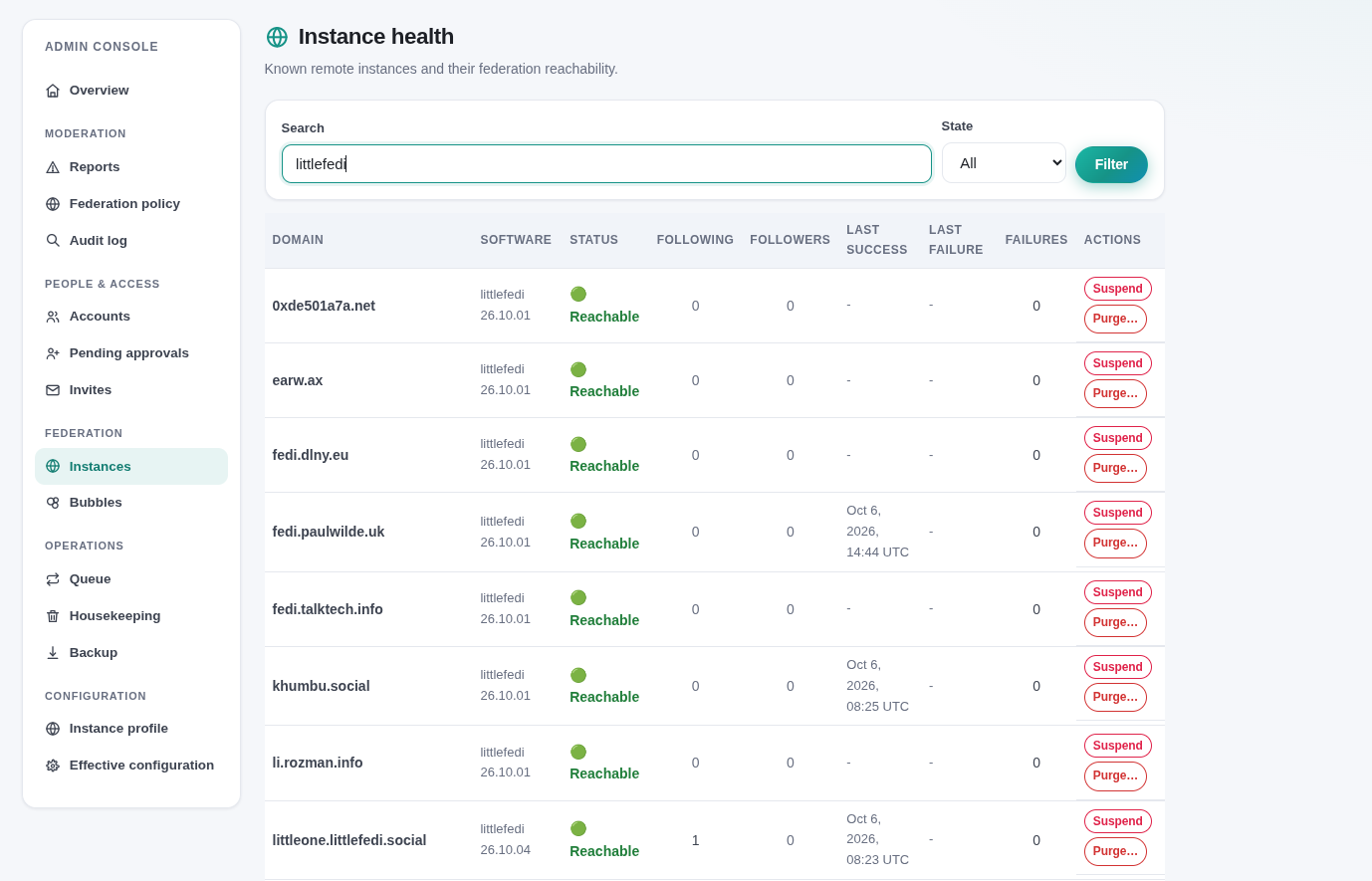
Daily #LittleFedi database size update. Day 2 (54 posts, 35 followers, 133 following, 333 connected instances)
-rw------- 1 ubuntu ubuntu 9.0M Oct 6 17:13 littlefedi.db
My embryonic #LittleFedi instance is connected to these instances. Excuse to play with Markdown tables.
| Platform | Count |
|---|---|
| Mastodon | 238 |
| Littlefedi | 14 |
| snac | 13 |
| GoToSocial | 12 |
| hometown | 7 |
| pleroma | 4 |
| akkoma | 3 |
| sharkey | 3 |
| friendica | 2 |
| WordPress | 2 |
| ghost | 2 |
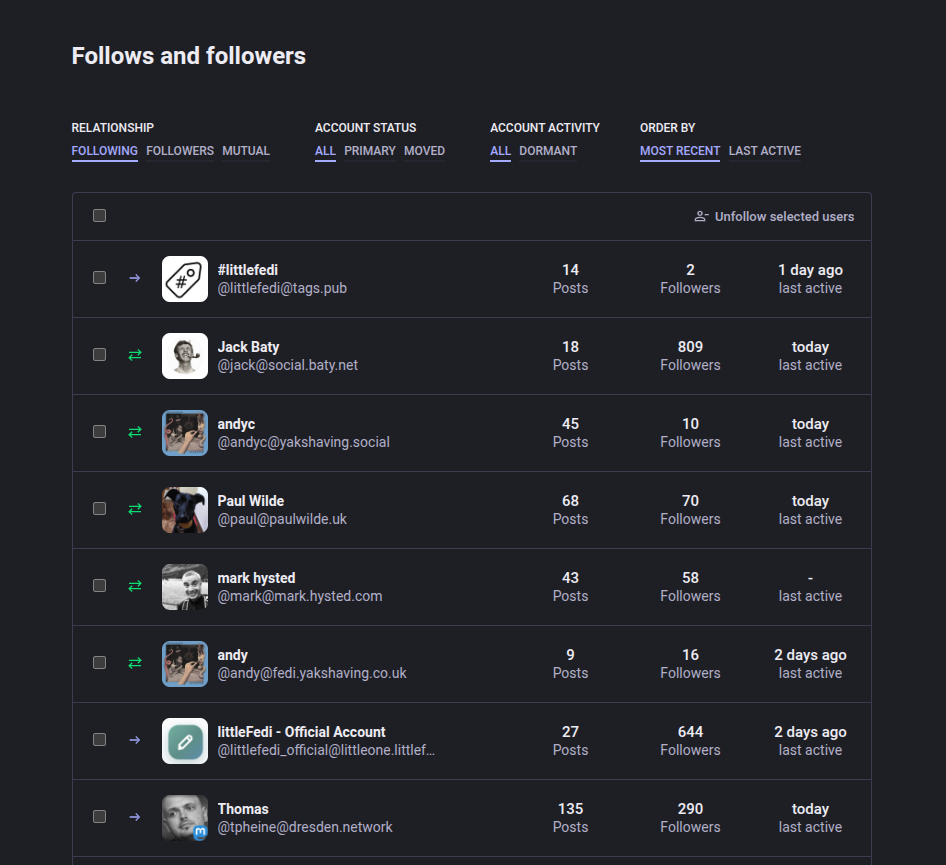
#LittleFedi enhancement request.
Mastodon (or Tusky) listed Friend (Follows) with properties that helped pruning inactive, dead accounts (Last active, Posts, Relationship) and supported bulk operations. Would be nice to have this search and filtering functionality in LittleFedi.
I note that sometimes the #Tusky timeline lags my #LittleFedi Web interface despite what I thought was a forced refresh.
However, the responsive LittleFedi Web interface renders so brilliantly on mobile devices, I'm not sure this is much of an issue. Just curious if other folk see this behaviour.
#LittleFedi includes a powerful CLI that allows administrators to perform any operation available in the GUI. Useful for management and scripting.
$ littlefedi --config littlefedi.toml admin
Usage: littlefedi admin <command> [options]

Admin commands:
  self-destruct          Confirm decommissioning, or show delivery status when enabled.
  create-user --username <name> [--password <pw>] [--admin] [--email <addr>]
    Create a new local user. If --password is omitted, you will be prompted. If --admin is set, the user is
    created as an administrator. Use --email to set the user's email address.
  set-admin --username <name>
   Toggle admin status for a user.
  list-users              List all local users.
  email-verification-report
    List existing users that require_email would lock out.
  show-user --username <name>
    Show detailed information about a local user.
  reset-password --username <name> [--password <pw>]
     Reset a user's password. Prompts if --password omitted.
  set-email --username <name> --email <addr>
     Set or change the email address of a local user.
  mfa-disable --username <name>
     Disable MFA for recovery; requires local CLI access.
  keys <status|encrypt|decrypt>
     Seal the ActivityPub private keys of local accounts at rest, or return them to plaintext.
     Needs LITTLEFEDI_FEDERATION_KEY_ENCRYPTION_KEY.
  delete-user --username <name> [--confirm]
      Delete a local user. Tombstones, federates Delete(Person), and removes all data. Requires --confirm.
  approve --username <name>
      Approve a pending registration.
  reject --username <name>
      Reject a pending registration (deletes the account).
  suspend --username <name>
      Suspend a user (tombstone + federate Delete(Person)).
  unsuspend --username <name>
     Clear suspension and reinstate a user.
  silence --username <name>
     Silence a user (hide from public timelines).
  unsilence --username <name>
     Remove silence from a user.
  disable --username <name>
     Disable a local user's login without removing content.
  enable --username <name>
     Re-enable a disabled local user.
  invite generate [--code <code>] [--uses <n>] [--expires <date>]
     Generate an invite code. Uses: max number of uses (0 = unlimited).
     Expires: YYYY-MM-DD.
  invite list             List all invite codes.
  invite revoke --code <code>
      Revoke an invite code.
  domain-block create --domain <domain> [--severity silence|suspend|noop]
                          [--comment <text>] [--public] [--reject-media]
                          [--reject-reports] [--obfuscate]
      Add an instance-wide domain block.
  domain-block list       List all domain blocks.
  domain-block delete --domain <domain>
      Remove an instance-wide domain block.
  domain-block import --file <path>
      Import text, generic CSV, or Mastodon CSV blocks.
  domain-allow create|list|delete|import
      Manage limited-federation domain allows.
  federation mode open|allowlist
      Change federation mode without restarting.
  commercial-bigtech enable|disable|refresh|status
     Manage the official commercial Big Tech list.
  media prune             Remove orphaned media (DB records with no status) and unreferenced
                                   media files (disk files with no DB record).
  media prune-orphans     Remove only orphaned media DB records.
  media prune-files       Remove only unreferenced media files from disk.
  media storage-migrate DESTINATION_CONFIG
      Start a native, resumable owned-media migration.
  media storage-status    Show the active migration.
  media storage-cancel ID Request cancellation.
  media storage-resume ID Resume or retry a migration.
  media storage-manifest  Emit owned-media JSONL for rclone verification.
  relay add --actor <https-url>
      Save and enable a LitePub relay actor.
  relay list             List relays and handshake states.
  relay status --actor <https-url>
  relay enable --actor <https-url>
  relay disable --actor <https-url>
  relay remove --actor <https-url>
  blog rebuild [--username <name>]
      Regenerate a local account's static blog site now (blog build only; requires [blog] enabled = true).
  blog rebuild-all       Regenerate every allowed-to-blog local account's static site now (blog build only).
  refresh-actors          Queue a forced refresh of every known remote actor, even if not yet due.
                                  Fetches run in the normal background queue workers, not immediately.
I have conquered today's mission of getting #LittleFedi to send email notifications. Took another 3 hours and I couldn't possibly document the process or hope to reproduce it in a clean environment but still.
Ah now I remember. One of my reservations of a lonely, isolated single instance was discovery and search on a global basis, having to mess about with relays but https://tags.pub/ should help with this.
However, when I follow @littlefedi@tags.pub from #LittleFedi, it just says 'Follow requested' whereas on Mastodon (4.6.9) it works instantly.
Any ideas @evan@cosocial.ca ?
People never write in and ask 'How large is your #LittleFedi SQLite database after 8 hours in production with 27 followers and 127 follows ?'.
This is just a checkpoint (for me) to track growth in the coming days and weeks.
-rw------- 1 ubuntu ubuntu 4.1M Oct 5 15:03 littlefedi.db
@stefano@bsd.cafe I would prefer the 'Bubble' tab to exclude my own content. My use case is I want to see 'fosstodon.org's timeline. I don 't see why it is sensible for this stream to include my posts.
Secondly, for a single user instance (which might be a significant number of #LittleFedi users), the 'Local' tab is obviously redundant so a configuration option to reorder/hide tabs might be useful.
Is there any issue tracker where users can log bugs and enhancement requests ? Thank for a fantastic package BTW !
What happens when a post gets attention on your #LittleFedi instance. Nothing.
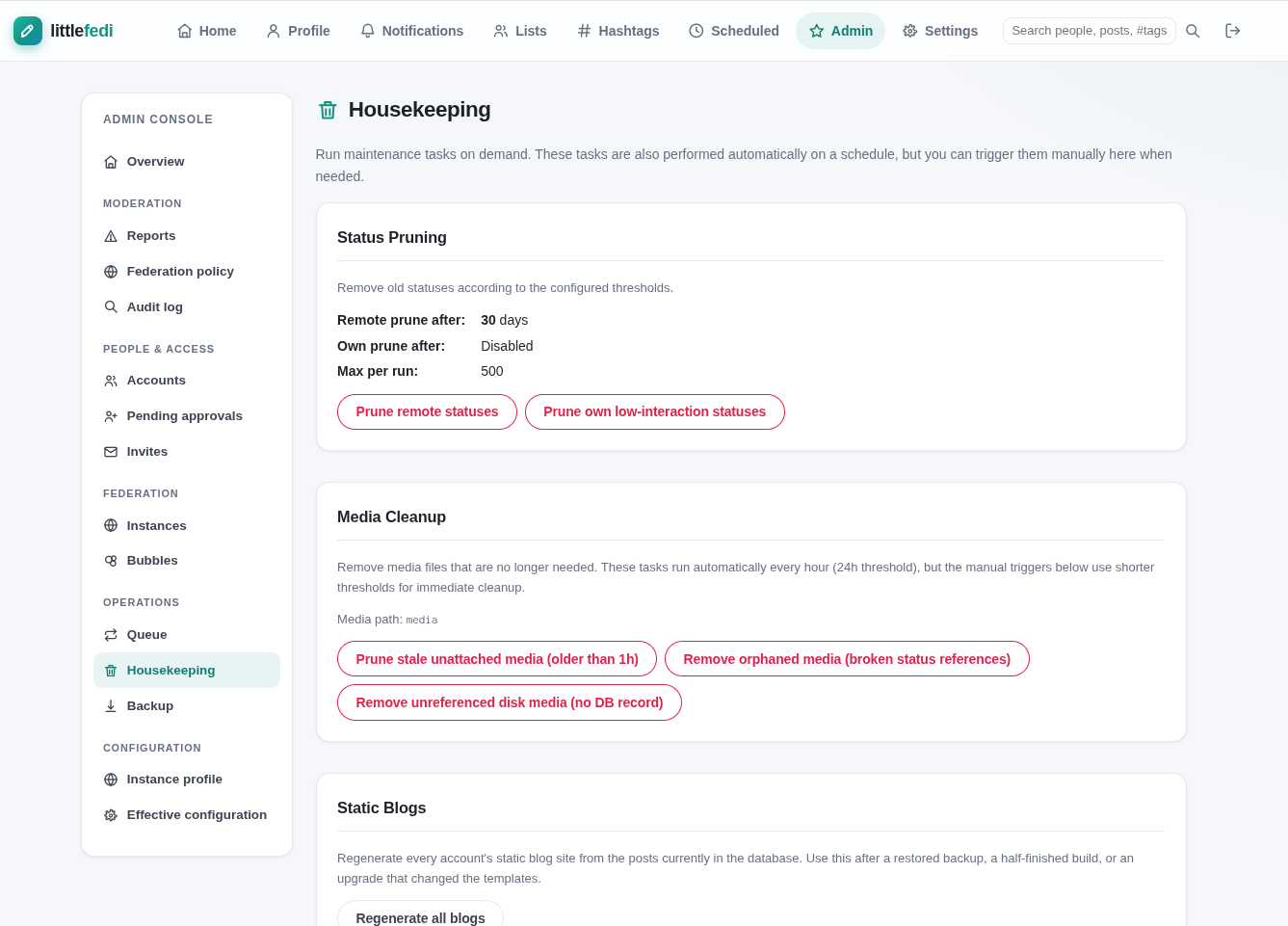
Who wants to bother about purging old posts and deleting stale media (cat photos) to save space ?
No one. That what's well designed software with sensible defaults is for.
I'm no stranger to self hosting Fediverse/ActivityPub applications.
Crikey, I ran Laconica back in 2009 when @evan@cosocial.ca still had a moustache.
I have also hosted GotoSocial and Pleroma. Never took the step to get Mastodon running (seemed too heavyweight, complex and intimidating).
However, I can't emphasise how different #LittleFedi is for a normal, non-technical user who has some spare hosting capacity available and just wants to install, configure a Fediverse presence and then forget about it.
Which seems precisely the design aim of LittleFedi and this quote from @stefano@bsd.cafe really resonated with me.
'What I kept wanting was something I could put on a small machine, in a corner, and then stop
thinking about. No runtime to keep current, no database server to babysit, no container stack, no
build pipeline that breaks the week I am travelling'.
https://littlefedi.org/index.html
[ PS. I received no authentic Italian pizzas for creating this post ]
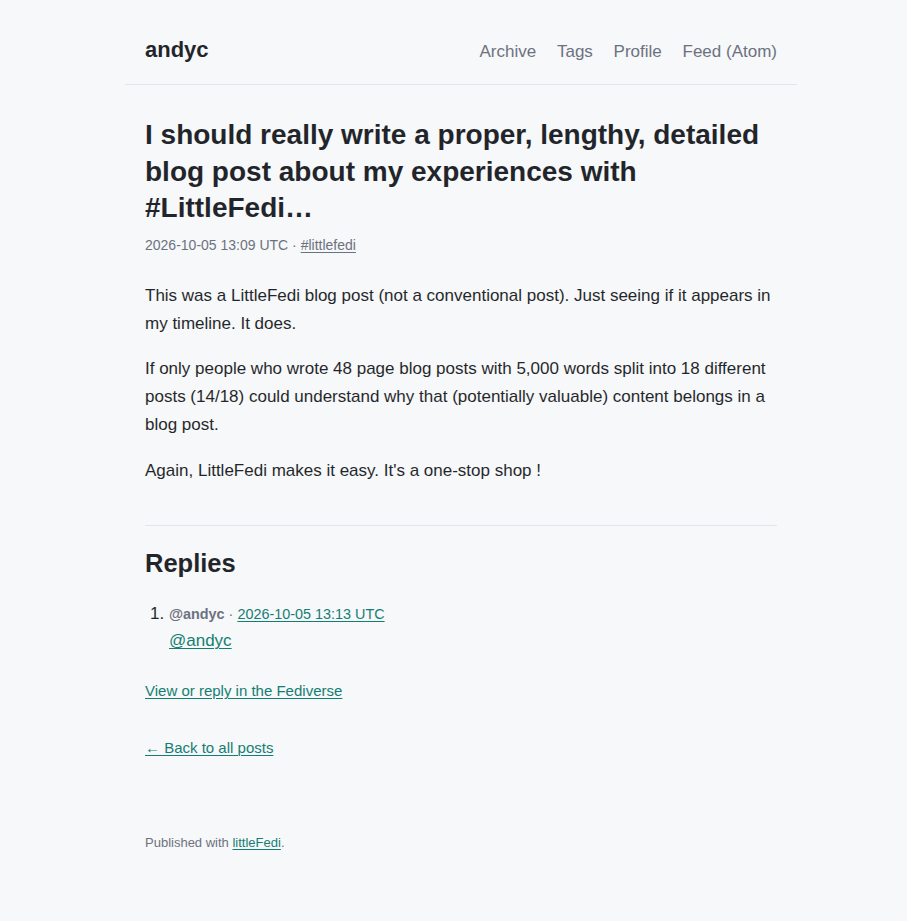
Funny how every blogging platform and theme that appeals to me resembles strongly resembles write.as.
For example, here is a blog post in #LittleFedi
I should really write a proper, lengthy, detailed blog post about my experiences with #LittleFedi but there's so much to say and I'm so lazy. Much easier to post assorted screenshots, notes and jottings.
This was a LittleFedi blog post (not a conventional post). Just seeing if it appears in my timeline. It does.
If only people who wrote 48 page blog posts with 5,000 words split into 18 different posts (14/18) could understand why that (potentially valuable) content belongs in a blog post.
Again, LittleFedi makes it easy. It's a one-stop shop !
I run #LittleFedi as a systemd service. Here is my unit file - '/etc/systemd/system/littlefedi.service'
[Unit]
Description=littleFedi Server
After=network.target
[Service]
Type=simple
User=ubuntu
WorkingDirectory=<dir>/littlefedi
ExecStart=<dir>/littlefedi/littlefedi --config <dir>/littlefedi/littlefedi.toml
Restart=always
# Load the secure environment variables here:
EnvironmentFile=/etc/littlefedi.env
[Install]
WantedBy=multi-user.target
As the instance is less than a day old, I like to monitor activity in real-time using:
$ sudo journalctl -u littlefedi -f
30 mins to install and configure a fully functional LittleFedi server.
4 hours and 27 minutes to fruitlessly try to configure #LittleFedi to send email notifications.
Tried relaying to Gmail, msmtp and hundreds of different combinations.
Giving up for now but this will nag away at me like the Chinese water torture of a slowly dripping tap.
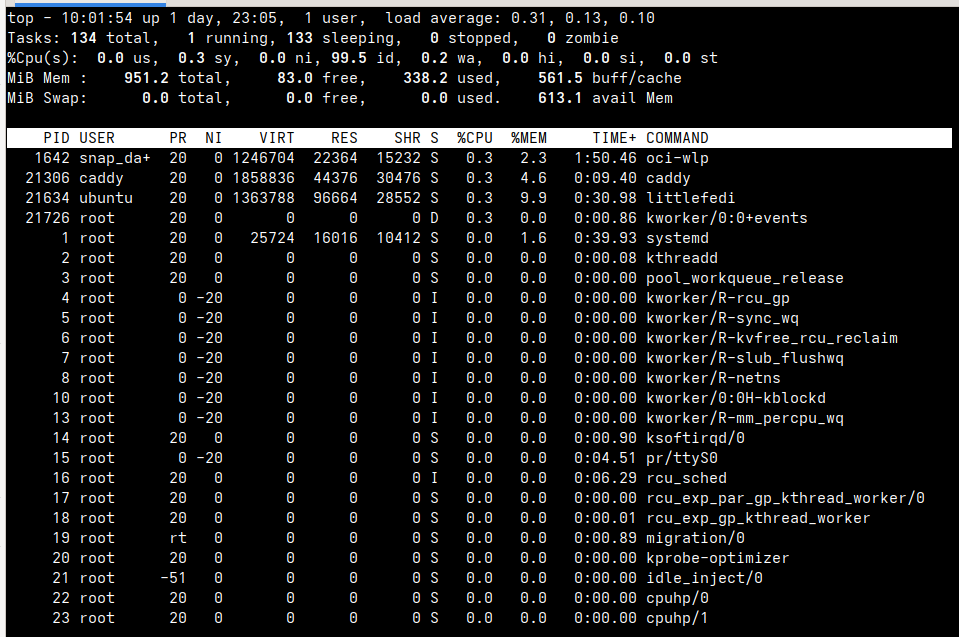
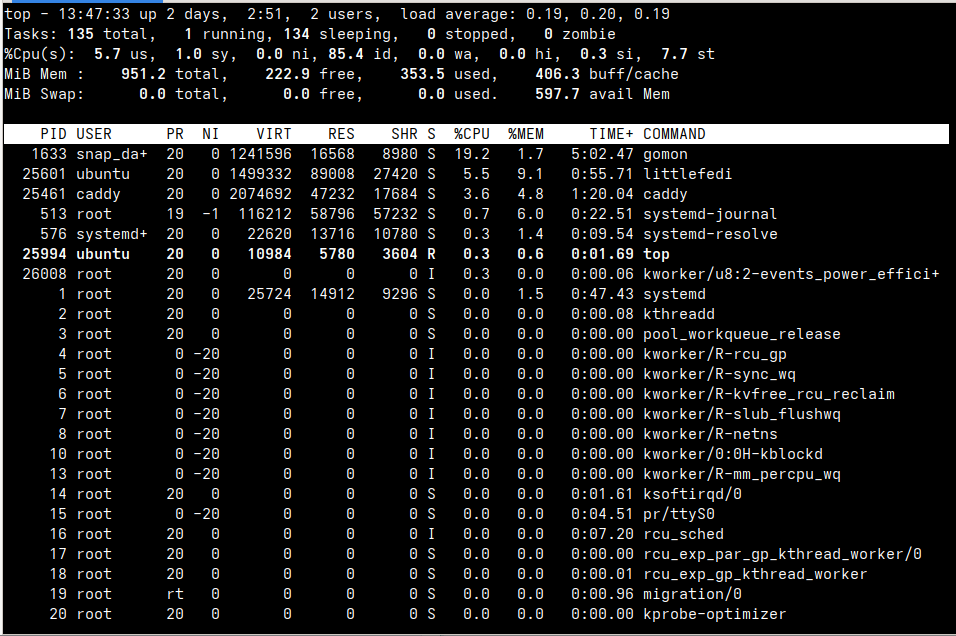
The load average and memory usage on the tiny cloud VM (1 CPU, 1GB) on my single #LittleFedi user instance.